Let ChatGPT or Claude build your Home Assistant cards
AI assistants write excellent HTML and CSS, but they struggle with the options of each custom card. HTML Action Card takes what they are good at: describe the card, get HTML back, paste it. A security rating then shows what the generated code does before you use it.
Or in HACS: ⋮ → Custom repositories → https://github.com/davidrot/ha-html-action-card, type Dashboard.
Three steps
- Paste the prompt from the repository into ChatGPT, Claude or another assistant. It explains the syntax.
- Describe the card: “A remote for my TV with big round buttons, volume on hold, entity media_player.living_room.”
- Paste the answer into the card editor. Declared entities appear as a form, the rating appears on top.
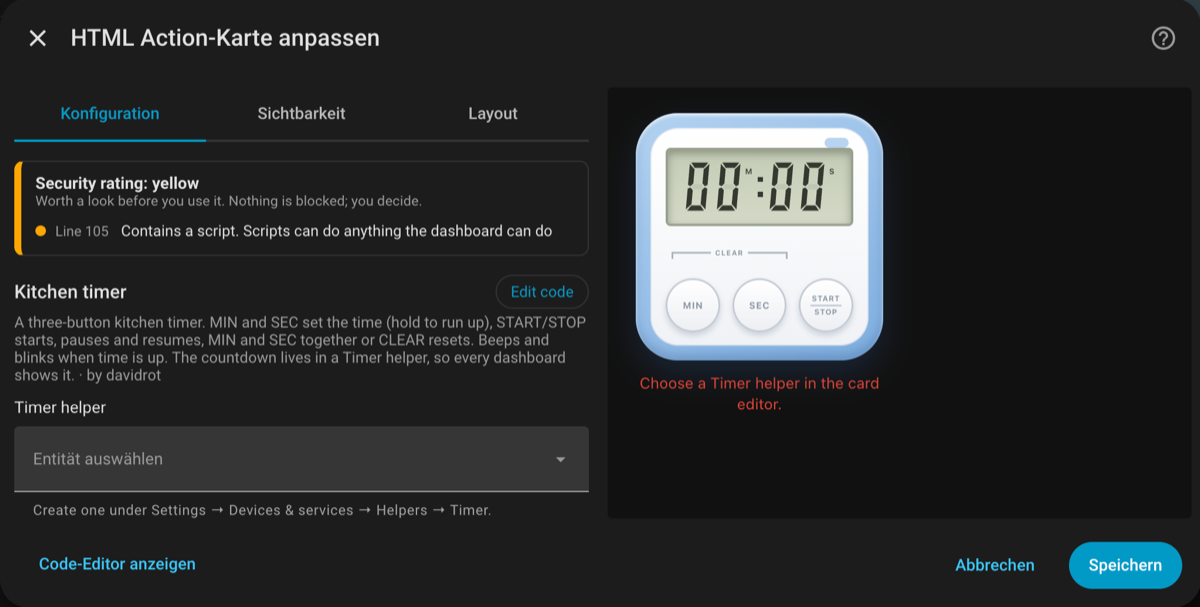
The editor: rating with reasons on top, the card's inputs as a form below.
Why a rating instead of a sandbox
Pasted code should be understood, not silently changed. The rating is green for plain markup, yellow for scripts, external resources or sensitive actions without confirmation, and red for things like iframes, external scripts or network and storage access. Every finding names the line. Nothing is blocked: you decide.